
Deltek will retire certain Costpoint authentication methods effective July 30, 2026. Users in affected cloud environments who do not transition to approved login methods may lose system access. Contractors should evaluate current configurations, coordinate with IT, and plan timely updates to avoid operational disruption and potential compliance impacts.
Highlights
- Authentication Retirement. Deltek will retire Active Directory and Database authentication methods for certain Costpoint cloud environments effective July 30, 2026, eliminating commonly used legacy login options.
- Affected Environments. The change applies to Costpoint systems hosted in the Deltek cloud and primarily impacts GovCon Cloud standard environments. GCCM, on premises installations, and systems hosted by providers other than Deltek are not affected by this authentication retirement.
- No Extension. Users who are not migrated to an approved authentication method before July 30, 2026, may lose access to Costpoint, with no workaround or deadline extension available.
- Approved Methods. SAML Single Sign On and Passkey FIDO authentication will remain valid, shifting responsibility for user access controls and security configuration to contractors and their IT teams.
- Operational Impact. Contractors must review user configurations, integrations, and developer access to prevent login disruptions that could affect accounting, reporting, and contract execution.
If you are a Deltek Costpoint customer, you have probably heard that Deltek plans to change how your users will login to Costpoint this July. Although the change is critical, the impact won’t be serious if you start preparing now.
Deltek will retire two commonly used authentication methods on July 30th, 2026. These authentication methods (detailed below) are generally considered to be less secure than other methods. Deltek is mandating this change in the interest of safeguarding customers’ Costpoint data going forward.
What does this mean? It means that you and your users may not be able to login to Costpoint starting July 30th if you do not review the authentication methods for your users’ accounts and adjust accordingly.
There is no workaround, and there is no possibility of an extension of the deadline. Your users MUST be using the new authentication methods before July 30th.
Apologies in advance, this is going to be a bit on the technical side, but I’ve tried to keep it as straightforward as possible. This is incredibly important, however, and I encourage you to read carefully as well as forward this to your IT team
Who Is Potentially Affected?
This change will affect customers whose Costpoint is hosted in the Deltek cloud, and it will primarily affect GovCon Cloud (GCC) standard environments. If your system meets one of the following criteria, your users will NOT be affected and will be able to login as usual after July 30th:
- If your Costpoint system is hosted by Deltek in a GovCon Cloud Moderate (GCCM) environment
- If your Costpoint system is hosted by a cloud provider other than Deltek
- If your Costpoint system is in-house (commonly called an on-premises installation)
What Is an Authentication Method?
Basically, it’s how Costpoint verifies who you are when you login. A user typically enters a username and password on the login page, and Costpoint takes that information and compares it to a password list somewhere. If the password matches, the user can login and do stuff in Costpoint.
The authentication method tells Costpoint where to find that list. The method also determines how a lost password can be reset and who can handle that reset for you.
Costpoint supports a lot of authentication methods. In this article, we’ll go over four of the most common ones: the two methods that are going away on July 30th, and two methods that are recommended alternatives to which you can migrate your users before the deadline.
Active Directory Authentication is Going Away July 30th
If you are using Costpoint in Deltek’s GCC standard environment, you probably have a username in the form of 12345.JOHN.SMITH. This authentication method is called Active Directory, and it is the standard method that Deltek uses for all non-GCCM customers. You can verify if a user is configured with this method in the Manage Users application in Costpoint, on the Authentication tab:
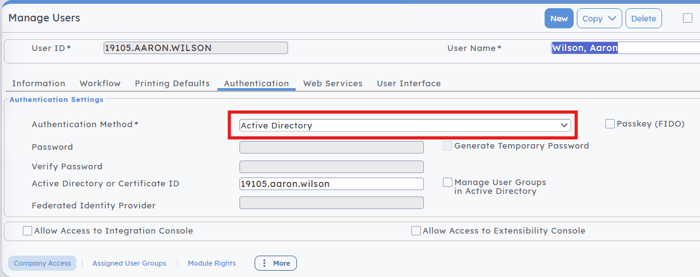
When a new user was added to Costpoint, your company’s Costpoint administrator would create an account for the user on Deltek’s “ADManager Plus” website as well as inside Costpoint via the Manager Users application. The user would then be able to set their own password via a link that Deltek provided and reset the password themselves when necessary.
Any user account configured for Active Directory authentication will need to be migrated to a different authentication method before July 30th, or the user will NOT be able to login to Costpoint. But don’t worry, we’ll guide you through what you need to do later in this article.
Database Authentication is Going Away July 30th
A less common way to login to Costpoint is to have a username that does not stick to the 12345.JOHN.SMITH format. It might be JSMITH, 00123 or another familiar username. If this is the case, the user account might be using the Database authentication method. This login method is common for on-premises installations of Costpoint, and some companies have chosen to use it in the cloud for short-term user accounts for consultants, etc. Again, you can verify this by looking up the user in the Manage Users application in Costpoint, on the Authentication tab:
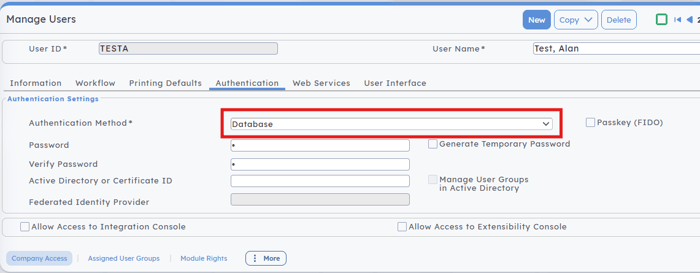
With this method, the Costpoint administrator would create a new user account in only one place: the Manager Users application. The password would also be set here without the user being involved, and then the username and password would be given to the user so they could log in. If the password needed to be reset, the Costpoint administrator would usually need to handle it.
Any user account configured for Database authentication will need to be migrated to a different authentication method before July 30th, or the user will NOT be able to login to Costpoint.
SAML Single Sign-On Will Remain Valid After July 30th
If you are operating in Deltek’s GCCM environment, you are already using SAML Single Sign-On (sometimes called just SSO). This authentication method allows users to login to Costpoint with the same username and password that they use to login to their computer, email, SharePoint, OneDrive, etc. The “single sign-on” part of the name is key: the idea is for users to only need one set of credentials for everything they need to do on their computer, and ideally for them to have to only enter the password once. Users may also be required to use multi-factor authentication when they login, which typically involves a code being sent to the user’s phone to prove who they are.
You can verify if a user is currently configured for SSO via the Authentication tab in the Manager Users application:
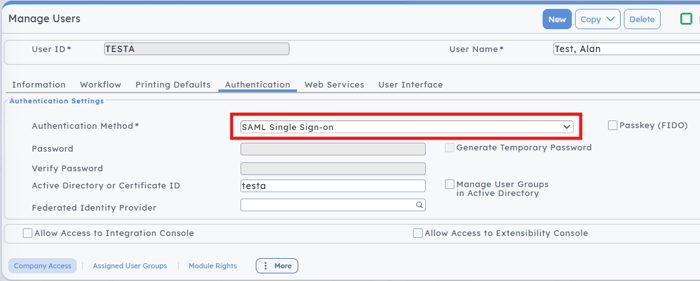
This is the preferred authentication method going forward. It reduces the number of username/password combinations a user must remember, it enforces modern security in the login process, and it puts user account maintenance exclusively under the control of your company. All passwords are stored inside your own network, and Costpoint communicates directly with your servers to determine if a user is allowed to login.
Getting SAML SSO setup will require the involvement of your IT team. There is a good deal of configuration that must happen within both Costpoint and your own network. The process is straightforward but will require time.
Passkey (FIDO) Will Remain Valid After July 30th
Another option for users is a passkey, sometimes referred to as Fast Identity Online (FIDO). This method does NOT require a password to login. Instead, the user enters their username and then uses a fingerprint scanner on their computer or their phone to complete the login process. You can also use facial scanning on your phone if available.
You can see when a user is configured to use a passkey to login by referring to the Authentication tab in the Manage Users application:
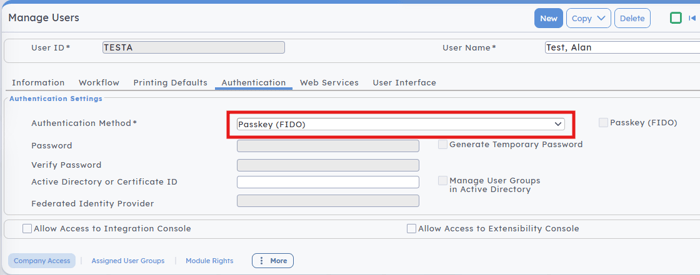
Passkeys are very secure, but you should check with your IT group to verify that they are okay with passkey logins to Costpoint. Also, since there is no password involved, there is no such thing as a password reset. If you lose or replace your phone, the passkey must be recreated with the help of your Costpoint administrator. IT generally doesn’t have to be involved with the setup or maintenance of users’ passkeys.
Now, you might think passkeys are easier to implement than SAML SSO, and for the most part, you would be right. There are other factors to consider, however, and your IT team may have some valuable input for the discussion. For what it’s worth, we at Redstone recommend implementing both SAML SSO and passkeys, using the former as your “primary” login method and the latter as an option for users who prefer biometric logins.
Enough Techno-Babble, What Do We Need To Do?
We have a few months, but it is best to get started on this as soon as possible. You can activate and configure both SAML SSO and passkeys without affecting any of your existing users or their current login process. Once you have the new methods setup and tested, you can start migrating your users, either a few at a time or all at once. Let’s talk next steps.
Step #1 – Get Your IT Team Involved Now
Both recommended authentication methods are going to require IT support. They will need time to properly plan and implement their pieces of the new authentication methods. There may also be questions to be answered regarding your IT policy and what is or isn’t allowed. Getting them into the discussion early will prevent a lot of stress later as the July 30th deadline approaches.
Step #2 – Determine What Needs to Be Changed
Look through your users in the Manage Users application, and document which authentication methods are being used now. Find out if you have any software external to Costpoint that connects to Costpoint directly to upload or retrieve data, and if so, how that software connects to Costpoint. Are there any users in your system who have been granted developer access in Costpoint, with the ability to create and manage extensibility projects, Costpoint BI packages, or integrations via the Integration Console? Make a note if any of these scenarios apply to you, as they will all have to be addressed before July 30th.
Step #3 – Reach Out to Redstone Government Consulting
As trite as it sounds, we are here to help. If you have questions or concerns about the changes, need guidance on how to approach them, or even assistance in implementing the recommended authentication methods, please reach out to the Costpoint group here at Redstone. We’ve been monitoring this change since Deltek first hinted that it was coming, and we have helped customers implement both recommended methods in GCC and GCCM environments.
Let’s Solve This Together
While this update may sound concerning, the risk is very real. Depending on how your Costpoint users are currently configured, failure to act could prevent users from logging in after July 30. The solution is straightforward, begin now by implementing SAML Single Sign On and Passkey FIDO authentication methods and developing a clear migration plan for your users. The process is manageable with proper planning, but it requires timely action. Redstone Government Consulting’s Costpoint team can assist with evaluating your current authentication setup, coordinating with your IT team, configuring new authentication methods, and guiding a smooth user migration to help ensure uninterrupted system access.
 Aaron is a Senior Managing Consultant with Redstone Government Consulting, Inc. He specializes in all matters technical in relation to Deltek’s software products, with an emphasis on system implementation, data migration between disparate accounting systems, business intelligence (BI) design and optimization, and data analysis. He is fluent in Structured Query Language (SQL) and has extensive implementation and management experience with Oracle and Microsoft database systems. Aaron is also a software developer who designs middleware applications to help synchronize data between Deltek products and external third-party systems such as outsourced payroll. Aaron began his career in Information Technology (IT) as a network installer, responsible for configuring new computers and servers for customers shortly after the dawn of the internet. He progressed into various support and administrator-level positions, eventually becoming Director of IT at a government contractor. Along the way, he learned how to install, upgrade, and troubleshoot the Deltek suite of products. This finally led to a pivot into technical consulting and the opportunity to assist clients with their implementations. Aaron has nearly 25 years of technical support experience with Deltek software, including 19 years working with Deltek Costpoint. He has in-depth knowledge of the inner workings of Costpoint and its related products (such as Time & Expense and Planning) and their data structures, which he leverages to perform successful migrations to Costpoint from other accounting systems (and vice versa) and to analyze data “under the hood” to help troubleshoot accounting issues.