Deltek has announced many new improvements over the past 2 years. From a completely new User Interface to simpler solutions, Deltek is working to create a more “harmonious” experience for its users. Today, we are going to review a newly released functionality that will hopefully reduce manual effort in correcting IRS Form 1099.
The Old Way of Correcting 1099s in Costpoint
Prior to this release, if a vendor reached out regarding incorrect data reported on Form 1099, companies would be required to pull the previously created Form 1099, reconcile it against the new data, edit the incorrect information in Costpoint, create the new Form 1099, print it, and manually mark it as a correction using pen and ink. They would then be required to make a copy and keep it as backup, which seems archaic given today’s technology.
To some, this method of correcting submitted Form 1099s worked and continues to work. But Deltek Costpoint has made great strides to make this process more seamless and less analog for its users. Let’s dive into it.
Out With the Old, In With the New
The month is March, and the year is 2026. Your accounting department has completed and submitted a total of 525 Form 1099s for Tax Year 2025 to the IRS, as well as to all recipients, only to be contacted by approximately half of the recipients regarding errors on Form 1099s – those errors included Tax IDs, addresses, and incorrect payment amounts. There are multiple options for correcting the Form 1099s:
- Break out a typewriter, type the correct data, make copies for backup and submit corrected versions (do typewriters still exist?).
- Manipulate the data in Costpoint, recreate the Form 1099s, check the correction boxes on the hard-copy versions, make copies for backup, and submit the corrections.
- Utilize Deltek Costpoint’s new 1099 correction process.
Let’s break down the above options
- Option 1. Is that really even an option, given how long it would take to type 200 Form 1099s on a typewriter? No.
- Option 2. Correcting Form 1099s in Costpoint prior to the new correction functionality requires users to manipulate the data in the Edit 1099 screen after recreating the 1099 information. Users are required to print the new Form 1099 and manually check the correction box. However, when only a few Form 1099s require correction, checking the box on the hard copy and making copies is a quick, easy solution.
Let’s focus now on Option 3: Deltek Costpoint’s new 1099 correction process.
Step 1 - Creating 1099 Correction Information in Deltek Costpoint
The first step to correcting Form 1099s in Deltek Costpoint is to create Correcting 1099s via the Create 1099 Information screen. The new functionality includes a Correcting 1099s box and a Recreate 1099s box, both of which must be selected to create a Correcting 1099s.
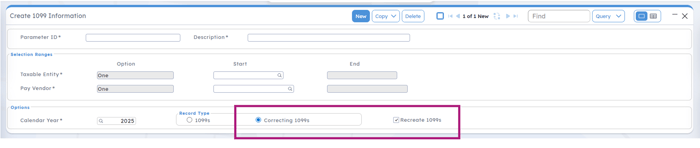
When the Correcting 1099s button is selected, the selection ranges automatically update from “All” to “One” and are not editable, which limits the ability to create multiple correcting 1099s at once. Remember, you must also check the Recreate 1099s button. After your selections are made, hit the gears or, if using Harmony, click the Actions button. Now, let’s proceed to Step 2.
Step 2 - Editing 1099 Correction Information in Deltek Costpoint.
The next step is to navigate to the Edit 1099 Correction Information screen. Query to review the Correcting 1099s created and choose a vendor.
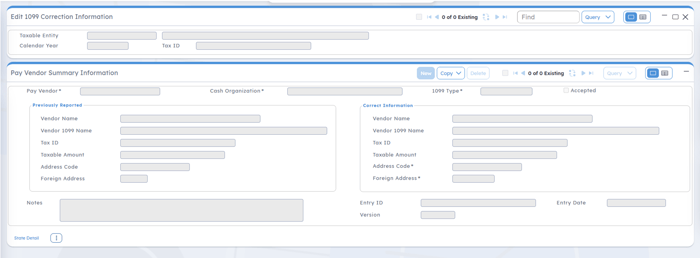
The new Edit 1099 Correction screen pulls the original 1099 data on the left and shows the fields on the right that can be edited. Once the Correct Information has been entered, users will SAVE the record and proceed to the next step.
Step 3 - Print Correcting 1099s in Deltek Costpoint
After the Corrected 1099s have been created and the information edited, they must be printed. The only difference between printing standard Form 1099s and Correcting 1099s is the Correction box, which must be checked when printing Correction 1099s. You will then print as normal.
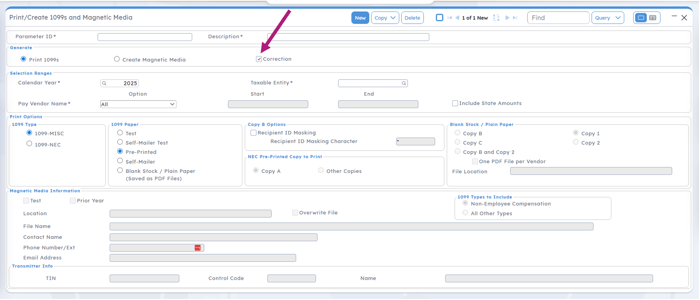
There is one final step.
Step 4 - Accepting 1099 Correction Information
Costpoint will not record the Correcting 1099 data until you have accepted the corrections. After printing the Correcting 1099s, navigate back to the Edit 1099 Correction Information screen. Query the pay vendor(s) for whom Correcting 1099s were created. Vendor by Vendor, you will need to click the “Accept” button at the top of the screen. Performing the accept task records the Form 1099 data in Costpoint’s data tables.
Improving Accuracy and Reducing Manual Effort in Form 1099 Corrections
As Deltek Costpoint continues to evolve, enhancements like the new Form 1099 correction functionality help government contractors reduce manual processes, improve accuracy, and strengthen financial reporting practices. Understanding how these updates affect your year-end procedures is important, especially when corrections involve financial records that may impact audits, vendor relationships, and overall data integrity. Redstone GCI supports government contractors through accounting system optimization, Deltek Costpoint training, and detailed procedure documentation that helps teams follow consistent processes. Our team also provides outsourced accounting services to help organizations manage reporting tasks, maintain accurate records, and support day to day accounting operations with experienced GovCon professionals.

 Kim Lay is a Senior Consultant with Redstone Government Consulting, Inc., specializing in Deltek Costpoint’s Accounting, Time & Expense, and Projects modules. With over 17 years of experience in government contract accounting, she provides expert guidance in Expense, Accounts Payable, and Billing. Kim plays a key role in supporting Redstone GCI’s Costpoint implementation clients, helping them optimize financial processes, maintain compliance, and improve efficiency. Her in-depth knowledge of Deltek Costpoint and practical, solutions-oriented approach allow her to provide meaningful insights and hands-on support to our clients. Kim has played a key role in numerous Deltek Costpoint upgrades and implementations, providing expertise in system configuration, training, and process optimization. She specializes in Deltek Expense, General Ledger and Accounts Payable modules, developing tailored training and instructional materials that enable employees, supervisors, and administrators to navigate Costpoint confidently. Her in-depth understanding of Deltek Costpoint’s multiple modules strengthens collaboration between accounting, employees, and external vendors. In addition to her technical expertise, Kim has extensive experience in government travel and expense compliance, including GSA regulations, the Federal Travel Regulation (FTR), and the Joint Travel Regulations (JTR). She helps organizations develop corporate travel policies that balance compliance with employee satisfaction, leads training sessions, and creates company-specific desk manuals to streamline expense reporting. Kim’s background in Accounts Payable includes full-cycle AP processing, vendor relations, 1099 processing, and sales & use tax compliance. She has contributed to the implementation of approved purchasing systems and process improvements that enhance efficiency and compliance. Her billing expertise spans multiple platforms, including WAWF, PLSC2, Transcepta, Morado, and Exostar, across various contract types. She works closely with cross-functional teams to ensure accurate invoicing, timely collections, and effective AR aging management. Kim’s broad knowledge of Deltek Costpoint and her extensive experience across multiple financial functions make her a key asset to Redstone GCI and our clients. Her commitment to excellence and client success ensures government contractors receive the high-level support they expect from Redstone GCI.